Tuesday, June 30, 2015

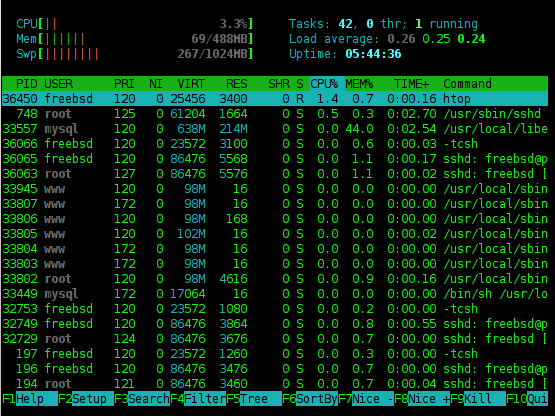
Install Htop in FreeBSD 10 Using Pkg

Htop is beautiful task manager on terminal.

You can install it with the step below
  • sudo pkg install htop
  • sudo ee /etc/fstab
  • Add "linproc /compat/linux/proc linprocfs rw,late 0 0" to the end of line
  • sudo mkdir -p /usr/compat/linux/proc
  • sudo ln -s /usr/compat /compat
  • sudo mount linproc
  • rehash
And done. You can type "htop" in the terminal and get beautiful task manager.

Tuesday, June 2, 2015

Enable 32 bit Environment on CentOS 7

Just execute this on terminal
yum install -y glibc.i686 glibc-devel.i686 libstdc++.i686 zlib-devel.i686 ncurses-devel.i686 libX11-devel.i686 libXrender.i686 libXrandr.i686
Source: https://fedoraproject.org/wiki/HOWTO_Setup_Android_Development

Monday, May 25, 2015

Install Phonegap Ubuntu


Install terlebih dahulu nodejs from source. Java SDK harus sudah terinstall terlebih dahulu dari cara di sini.
  1. Download source code nodejs 
  2. wget http://nodejs.org/dist/v0.12.4/node-v0.12.4.tar.gz
  3. extract
  4. tar xvzf node-v0.12.4.tar.gz
  5. Masuk ke folder source code tersebut
  6. cd node-v0.12.4
  7. Lakukan kompilasi
  8. ./configure
  9. make
  10. sudo make install
  11. Ubah permission folder tmp agar bisa dipakai oleh nodejs
  12. sudo chown -Rv namaUser /home/namaUser/tmp

Langkah berikutnya adalah install phonegap
  1. sudo npm -g install phonegap
  2. sudo npm -g install cordova

Langkah terakhir adalah setting Path android sdk
  1. Buka .bashrc dengan perintah "nano /home/namaUser/.bashrc"
  2. Tambahkan kedua export di bawah ini. Selain dimasukkan ke bashrc, eksekusi juga di terminal, sehingga efeknya langsung dapat dirasakan.
  3. export ANDROID_HOME=/home/akhfa/Android/Sdk
  4. export PATH=${PATH}:$ANDROID_HOME/tools:$ANDROID_HOME/platform-tools
Sumber jika ada error:
http://stackoverflow.com/questions/27211279/unable-to-fetch-platform-android-error-eacces
http://stackoverflow.com/questions/26356359/error-android-home-is-not-set-and-android-command-not-in-your-path-you-must-ful
http://stackoverflow.com/questions/18419144/npm-not-working-read-econnreset
http://stackoverflow.com/questions/21228995/how-to-clear-https-proxy-setting-of-npm

Friday, April 17, 2015

Install Java Oracle Centos 7

  1. wget --no-cookies --no-check-certificate --header "Cookie: gpw_e24=http%3A%2F%2Fwww.oracle.com%2F; oraclelicense=accept-securebackup-cookie" "http://download.oracle.com/otn-pub/java/jdk/8u25-b17/jdk-8u25-linux-x64.rpm"
  2. rpm -ivh jdk-8u25-linux-x64.rpm
Source: http://www.2daygeek.com/oracle-java-8-installation-centos-rhel-fedora/

Wednesday, December 31, 2014

Install Nagios from Sources in CentOS 6.X

Nagios is software monitoring. It can monitor server uptime, service, and so on. For more details, you can go here.

To install nagios, follow step below:

Wednesday, December 24, 2014

Set and Remove Proxy for Git

To set Proxy into git, do this step
  1. Open git console
  2. Type this
git config --global http.proxy http://proxyuser:proxypwd@proxy.server.com:8080
git config --global https.proxy https://proxyuser:proxypwd@proxy.server.com:8080
 Where:
  • proxyuser is username for proxy
  • proxypwd is proxy password for the username
  • proxy.server.com is address of the proxy. It can be IP address.
  • 8080 is proxy port. You can change it based on your proxy configuration
If you don't use username and password, you just need to use this format:
git config --global http.proxy http://proxy.server.com:8080
git config --global https.proxy https://proxy.server.com:8080
 If you want to unset proxy, just do this:
 git config --global --unset http.proxy
 git config --global --unset https.proxy

Saturday, December 13, 2014

Import Mysql Dump into PostgreSQL Ubuntu

First, you must dump mysql with command below
mysqldump --compatible=postgresql --default-character-set=utf8 -r nama_file.sql -u root -p db_name
 If you don't need mysql password, please remove "-p"

After that, you need to convert sql into psql. You can go github repository here.

After you get psql format, than you can import with
psql -U postgres -h localhost -d database_name -f nama_file.psql